Your WebMCP tool is ready. Can an agent reach it?
Why translated IPv6 addresses can confuse automated clients, what our checker reports, and how website owners can improve compatibility.
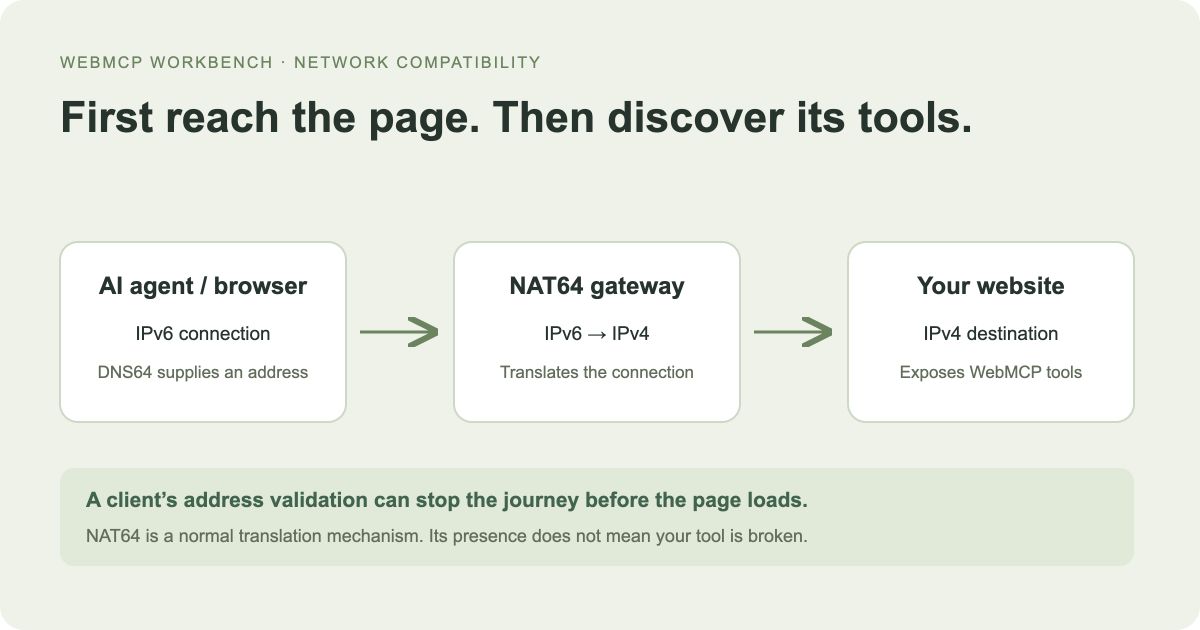
WebMCP discovery depends on loading the website first. A network compatibility problem can stop that process before the agent sees any tools.
Does NAT64 stop AI agents from finding WebMCP tools?
No. NAT64 normally enables access. A client with incorrect address validation may reject the translated address before loading the page. The client needs a compatibility fix; the website’s WebMCP registration can still be correct.
The issue we encountered
Our checker previously found a registered WebMCP tool on a public website. Later, the same check failed before discovery. The website’s registration code was still available: the failure came from our network address validation.
The checking network returned a public IPv4 address alongside an IPv6 address using the well-known NAT64 prefix. Our validator treated the translated address as unsupported and rejected the DNS response. This was a checker compatibility bug, not evidence that the website’s tool was missing.
What DNS64 and NAT64 do
DNS translates a website name into server addresses. An A record contains an IPv4 address; an AAAA record contains an IPv6 address. DNS64 can synthesize an IPv6 answer from an IPv4 address. A NAT64 gateway translates the resulting connection so an IPv6 client can reach an IPv4 server.
For illustration, 64:ff9b::c000:221 embeds the IPv4 address 192.0.2.33. These are documentation-only example addresses, not live server destinations. The 64:ff9b::/96 prefix is one standardized translation prefix; networks can use other prefixes too.
The translated answer can come from the visitor’s network rather than the website’s published DNS. Different visitors can therefore receive different answers for the same domain.
Why an automated client might reject it
Backend tools often validate destinations before connecting, to prevent requests to private networks, local services, and cloud metadata endpoints. A validator that does not understand address translation may reject a legitimate destination.
Many browsers and clients handle NAT64 correctly. Observing NAT64 does not prove that AI agents will fail, and it does not indicate a WebMCP defect.
How our checker handles it
For the well-known NAT64 /96 prefix, we validate the embedded IPv4 destination. Public destinations are accepted; translated loopback, private, link-local, and other disallowed destinations remain blocked. DNS validation and connection pinning still apply.
When our page check observes this prefix, we show a separate network compatibility note. The note does not change the tool discovery result. It describes what our checking network observed, not a universal diagnosis of the website.
This observation is limited to the well-known prefix we recognize. Absence of the note does not certify compatibility with every network or automated client.
What website owners can do
If your hosting provider or CDN supports native IPv6, enable it and publish the provider’s correct AAAA record while retaining IPv4 support. Verify the page, HTTPS certificate, scripts, and tool API endpoints work through both protocols. Only publish an IPv6 address your provider actually serves.
Do not copy a synthesized 64:ff9b::… address into your website’s DNS. That address depends on a translation gateway; it is not your server’s native IPv6 address.
Native IPv6 can reduce reliance on translation, but it cannot fix every client’s validation bug. No change to your WebMCP registration JavaScript is required for this particular issue.
Discovery and execution are separate checks
Finding a registered tool proves it was exposed during that check. It does not prove every agent can access the website, or that calling the tool will succeed. A tool’s API may have separate authentication, permission, availability, or network requirements.
Use the website checker to inspect discovery and the Playground to test execution with appropriate inputs and permissions.