Connect WebMCP tools to APIs or website JavaScript functions
Understand JavaScript discovery evidence, public function adapters, API connections, and how to verify your installed tool.
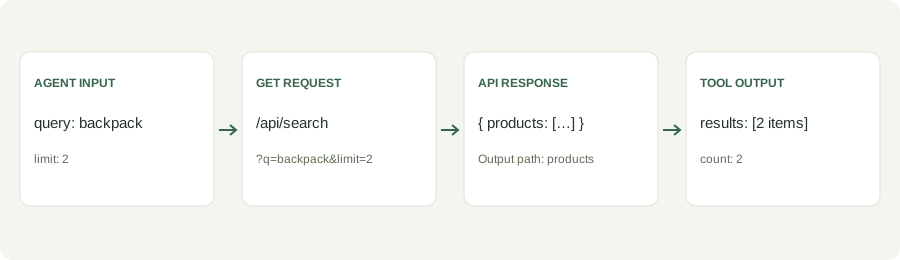
Choose the implementation your website already has
An API connection makes a public JSON GET request. A JavaScript connection calls an existing function exposed on window or globalThis on your website. Both need a real implementation; a suggested tool name does not create one.
- Public JSON API: obtain the endpoint, parameter names, and example response. Map inputs to query parameters and test in the builder.
- Website function: obtain the public function path, input signature, return shape, and read/write behavior. Export and install the adapter before testing in Playground.
What JavaScript discovery tells you
Find tool ideas inspects public scripts and handler references for function names, parameters, source locations, and exposure categories. It does not call discovered functions. Every candidate is unverified, including an assignment found on window.
Review is bounded: 20 inline scripts, 20 handler elements, four same-origin linked scripts, and at most 20 function entries. Linked scripts have a 192 KiB limit and three-second fetch timeout. Minified, dynamic, cross-origin, or unparseable code may be absent.
Public functions and private adapters
window.shop.searchProducts({ query: "backpack", limit: 2 });For this object call, define query and limit as named inputs. A positional function instead receives inputs in field order. Module-private functions need a public wrapper created by the website developer. Do not infer the calling convention or return value from the function name.
Generated adapters support asynchronous results. Functions that change data require confirmation, and underlying website authorization must still apply. A timeout stops waiting; it cannot undo completed actions.
Verify the complete workflow
- Confirm an API or public function with your developer.
- Define valid inputs and the output mapping.
- Test the API in the builder, or install the JavaScript-function export first.
- Check the published page for registration and execute the installed tool in Playground.
Read the connection checklist, JavaScript field guide, and Workbench demo for examples.